Creator of UnDercontrol
View all authors

Hand Off the Small Daily Decisions: Let Scheduled Jobs Prepare What You Study Each Day

· 7 min read
Creator of UnDercontrol

Learning a little every day is hard, and the hard part is often not the content itself but the few small decisions before you start: what to study today, where you left off, where the material is. None of them is big, but every day you make them all over again.

This post describes one way out: with udctl (UnDercontrol) scheduled jobs and an agent, you write those decisions down once and hand them over. After that you have one thing left to do each day: open a fixed place and look at what has already been prepared. Each benefit below comes with how the author runs it for their own English study.

We made a 5-minute video of this: watch it on YouTube. This post is the written version.
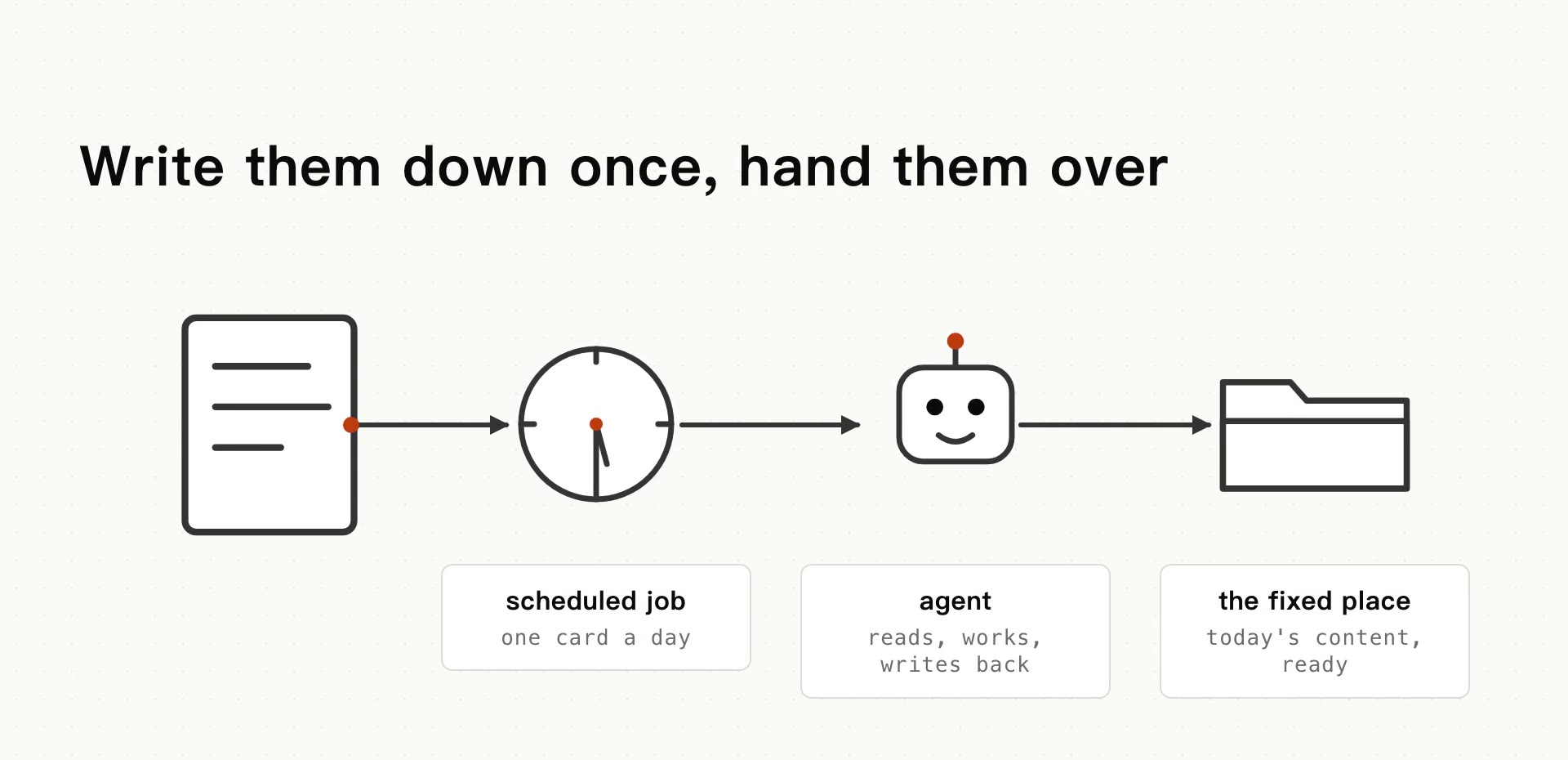
Four parts in a row: a scheduled job creates one card a day, an agent reads it, does the work and writes back, and the result lands in a fixed place

Nitro Boost: Knowledge Compounds, and Money Buys Time

· 8 min read
Creator of UnDercontrol

Knowledge compounds.

Most people have heard that line. Few work out what follows from it: if knowledge compounds, the most expensive stretch is not any of the later years. It is the beginning. When wealthy people pay money to save time, the beginning is what they are buying.

I like to think about it with a race car. A race car is slowest off the line, and getting from standstill to top speed takes the most time and the most effort. If you could hit the nitro and skip the low-speed phase, every second after that would cover more ground. And once you are at speed, holding it takes very little effort.

Learning works the same way.

A kubectl-Style CLI for Tasks: get, describe, apply

· 9 min read
Creator of UnDercontrol

After enough hours in kubectl, you start wanting the same moves for your tasks: get for a list, describe for the full picture, edit a file and apply it back. udctl (UnDercontrol) is a self-hostable workspace for tasks, notes and expenses, with a kubectl-style CLI (ud) and AI coding agents you dispatch from a task comment. The verbs in ud were modeled on kubectl. This post covers that CLI and how it differs from Taskwarrior.

One CLI for Self-Hosted Tasks, Notes and Expenses

· 6 min read
Creator of UnDercontrol

In self-hosting setups, tasks and money usually live in two systems: a board like Vikunja for tasks, Firefly III or Actual Budget for finances. Each is deployed, backed up and logged into separately, and the data in one knows nothing about the other.

udctl (UnDercontrol) is a self-hostable workspace for tasks, notes and expenses, with a kubectl-style CLI (ud) and AI coding agents you dispatch from a task comment. Below, one ud command creates a task, records an expense, and references that expense from a note on the task.

Why AI Answers Copy Out Full of ## and **

· 6 min read
Creator of UnDercontrol

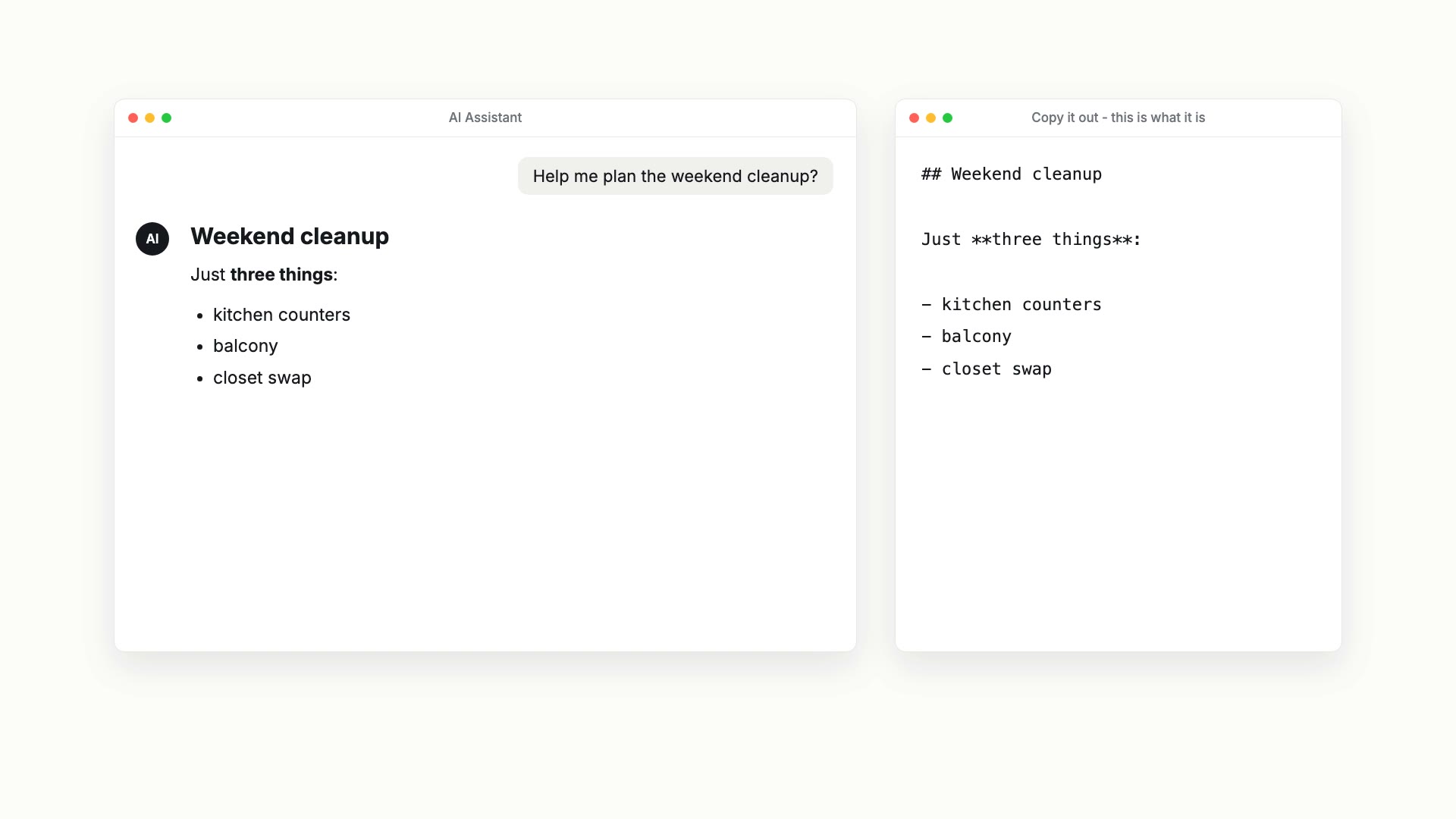
Ask an AI to plan a weekend cleanup and you get a neat heading, bold words and a list. Paste it into your notes app and this is what arrives:

## Weekend cleanup

Just **three things**:

- kitchen counters
- balcony
- closet swap

On the left, an AI assistant showing a rendered Weekend cleanup checklist; on the right, the same answer copied out as text, with the ## and ** still in it

The hashes, asterisks and dashes are Markdown. AI answers are written in it, and the tidy layout you see on screen is the chat app rendering it for you. Chances are you read Markdown every day, usually after it has already been formatted for you.

We made an 87-second video that shows this: watch it on YouTube. This post is the written version, with a little more detail.

Run Your Team's Server From Your Desktop

· 8 min read
Creator of UnDercontrol

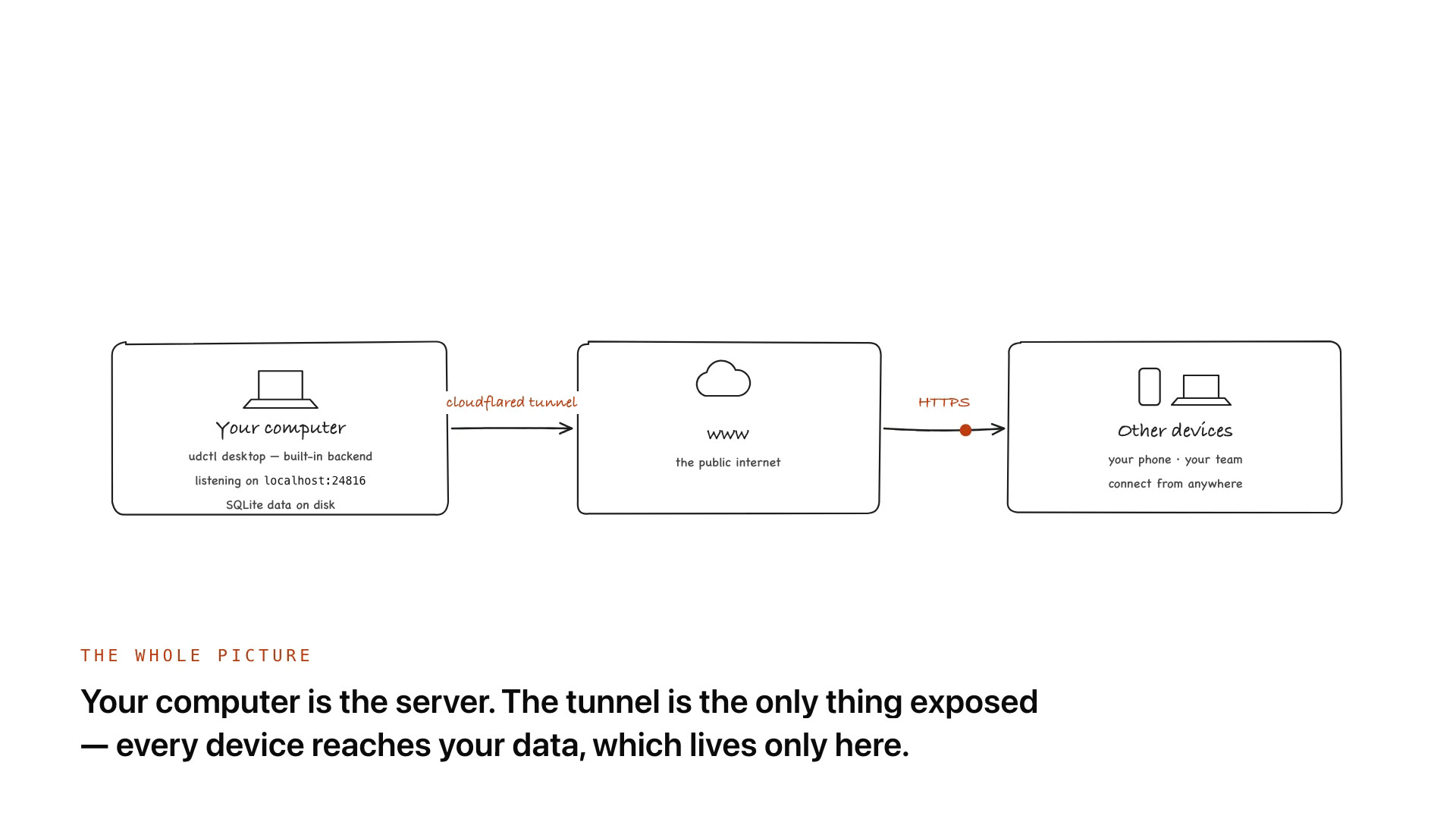
The udctl desktop app has a full backend inside it. Install it and your computer is already a server: it listens on localhost:24816 and keeps tasks, notes and ledgers in a SQLite file on your own disk. Add a license and that same server becomes a multi-user team backend. Add a Cloudflare Tunnel and your phone, your laptop and your teammates can reach it from anywhere. No VPS, no public IP, no router port forwarding.

Diagram: your computer runs the udctl desktop app with its built-in backend on localhost:24816 and SQLite data on disk; a cloudflared tunnel connects it to the public internet, and your phone and your team reach it over HTTPS

How Do I Use an AI Agent from the Command Line?

· 7 min read
Creator of UnDercontrol

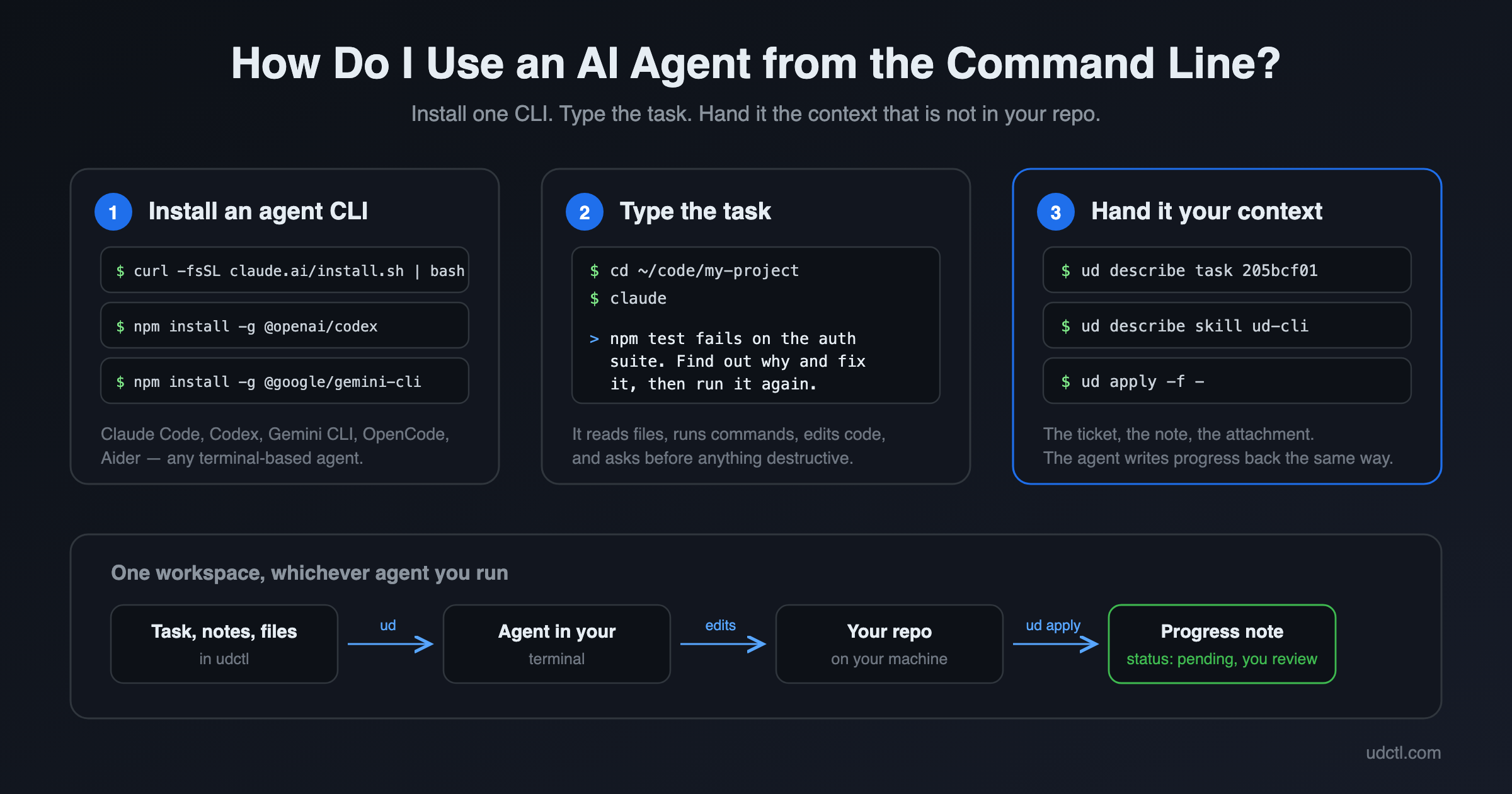
An AI agent CLI is a program such as Claude Code, Codex or Gemini CLI that runs in your terminal. You describe a task in plain English, it reads files, runs commands and edits code on your machine, and it asks before anything destructive. To use one: install it with a single command, open a terminal in the project directory, and type what you want done. Three steps, and the first two take about a minute.

An AI agent running in a terminal, reading a task and writing progress back

We only take what you hand us

· 8 min read
Creator of UnDercontrol

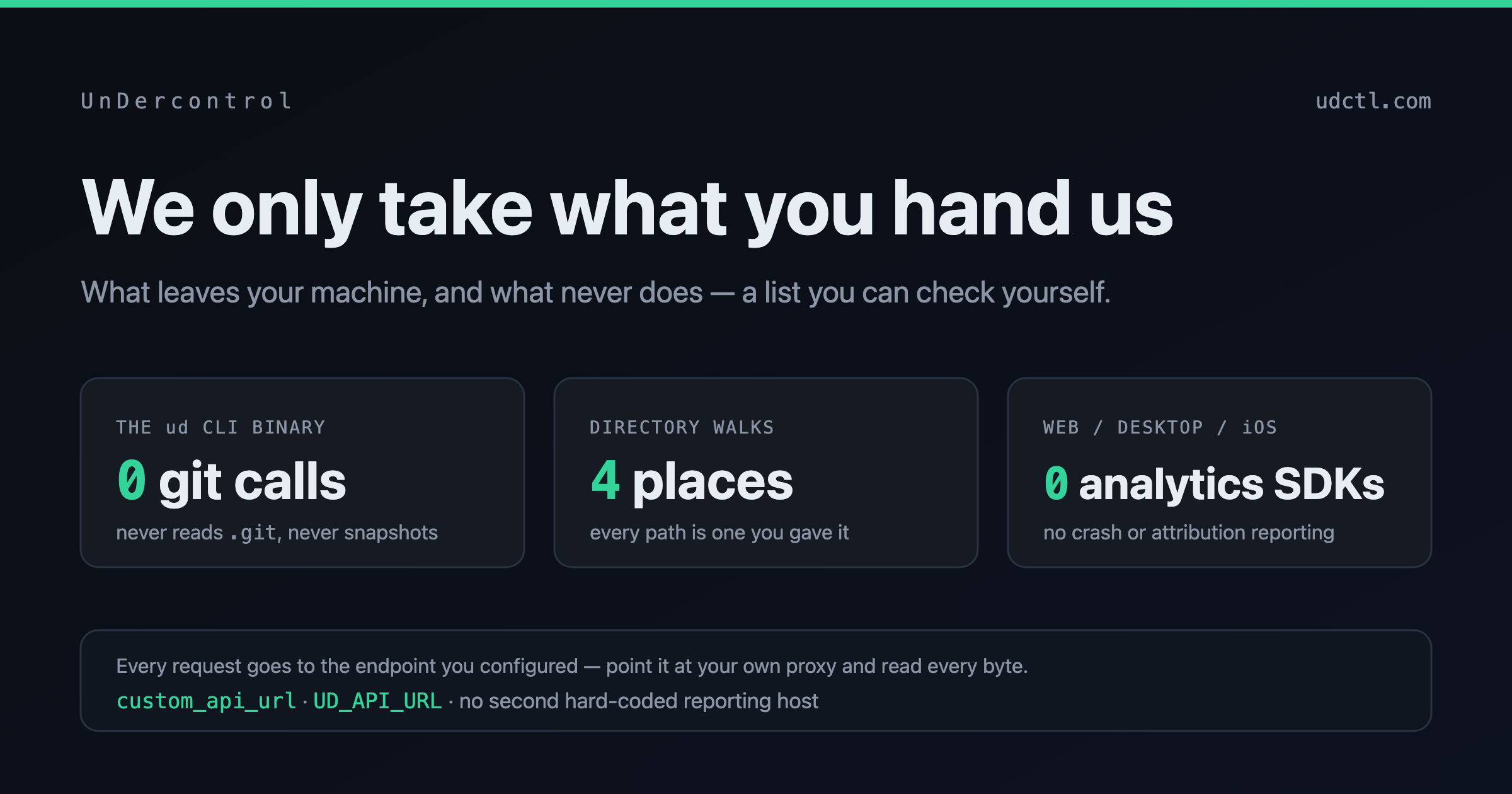
We only take what you hand us

On 18 September, someone reverse-engineered ZCode, Zhipu's desktop coding assistant, and found that once you were signed in it packed your entire working directory and uploaded it in the background. Not just the code you were editing — the full Git commit history, the LFS cache, the local branch records too. For the commercial project that got posted, one snapshot came to roughly 313 MB across forty-two thousand files, with .git accounting for 86.6% of it.

Zhipu apologised that afternoon. The problem came from a repository-indexing feature that shipped enabled by default, it was fixed, and they promised to open-source the client, bring in a third-party audit, and give every user an extra weekly quota reset. That is a decent response, and a fast one.

But there are two more layers here that matter more than "enabled by default".

Your context shouldn't live only on someone else's machine

· 11 min read
Creator of UnDercontrol

Reading back everything you said to an agent today sounds about as much fun as writing your own standup notes.

But if you don't, tomorrow it opens with "Hi, what project are you working on?" all over again.

Rather than re-explaining yourself every morning, let the work you finished land in a library you own, gather it once a day, and let the next agent pick up from there.

For the past year I've been moving between Claude Code, Codex and OpenCode, and I've written the same set of conventions three times: one copy in this agent's directory, one in that agent's config, one in my own head. Every time I thought that was finally settled. Then I'd open a different terminal and start explaining again.

Something else was going on at the same time. The work we actually finished together was scattered. Some of it in session logs, some in scratch files, some in a vendor's database, the copy I can read but can't take with me.

One of those looks like an efficiency problem and the other like an ownership problem. They're two ends of the same thing.

You work with agents all day, and when you stop, the chat box is the only thing that remembers.

Why a Ledger Gets Harder to Continue After One Missing Entry

· 4 min read
Creator of UnDercontrol

When one entry is missing, the first thing that breaks is often not the monthly report. It is your trust in the ledger.

You know it is already inaccurate. The next time you open it, adding that one entry is not enough. Did you miss others before it? Did the same purchase appear once in each of two channels? Was the original expense reversed after a refund arrived? If any of those questions remains unanswered, continuing feels like adding numbers to a crooked table.

That is where many people stop. They still want a record of their spending, but they do not want to spend more time on a result they no longer trust.