Your context shouldn't live only on someone else's machine
Reading back everything you said to an agent today sounds about as much fun as writing your own standup notes.
But if you don't, tomorrow it opens with "Hi, what project are you working on?" all over again.
Rather than re-explaining yourself every morning, let the work you finished land in a library you own, gather it once a day, and let the next agent pick up from there.
For the past year I've been moving between Claude Code, Codex and OpenCode, and I've written the same set of conventions three times: one copy in this agent's directory, one in that agent's config, one in my own head. Every time I thought that was finally settled. Then I'd open a different terminal and start explaining again.
Something else was going on at the same time. The work we actually finished together was scattered. Some of it in session logs, some in scratch files, some in a vendor's database, the copy I can read but can't take with me.
One of those looks like an efficiency problem and the other like an ownership problem. They're two ends of the same thing.
You work with agents all day, and when you stop, the chat box is the only thing that remembers.
So I started building my own knowledge base. It began because Obsidian sync kept getting in my way, and because I wanted the data to stay with me: a pile of markdown files I could take anywhere, in a format no single app owned. It grew into a whole workbench, called udctl (formerly UnDercontrol).
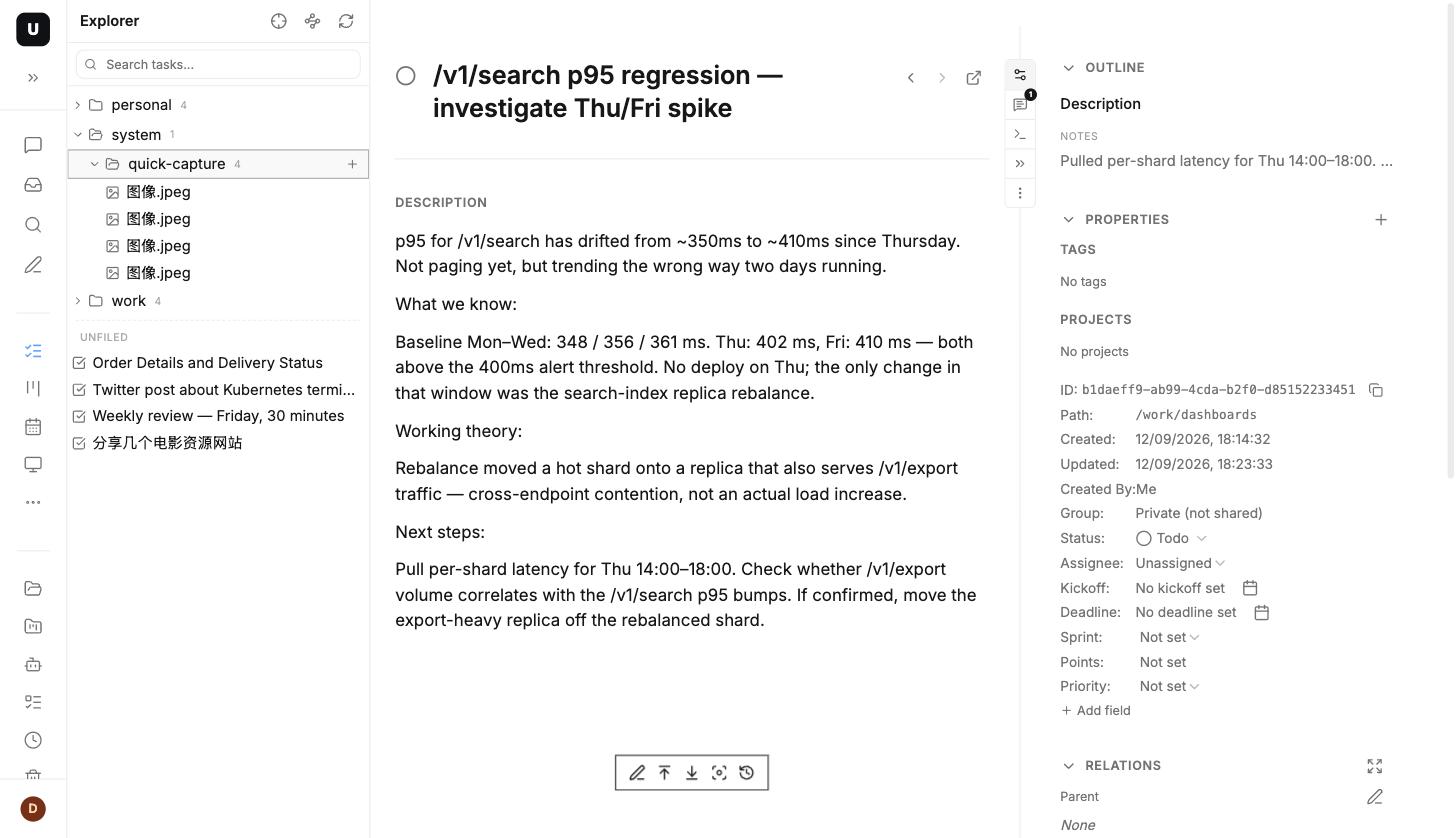
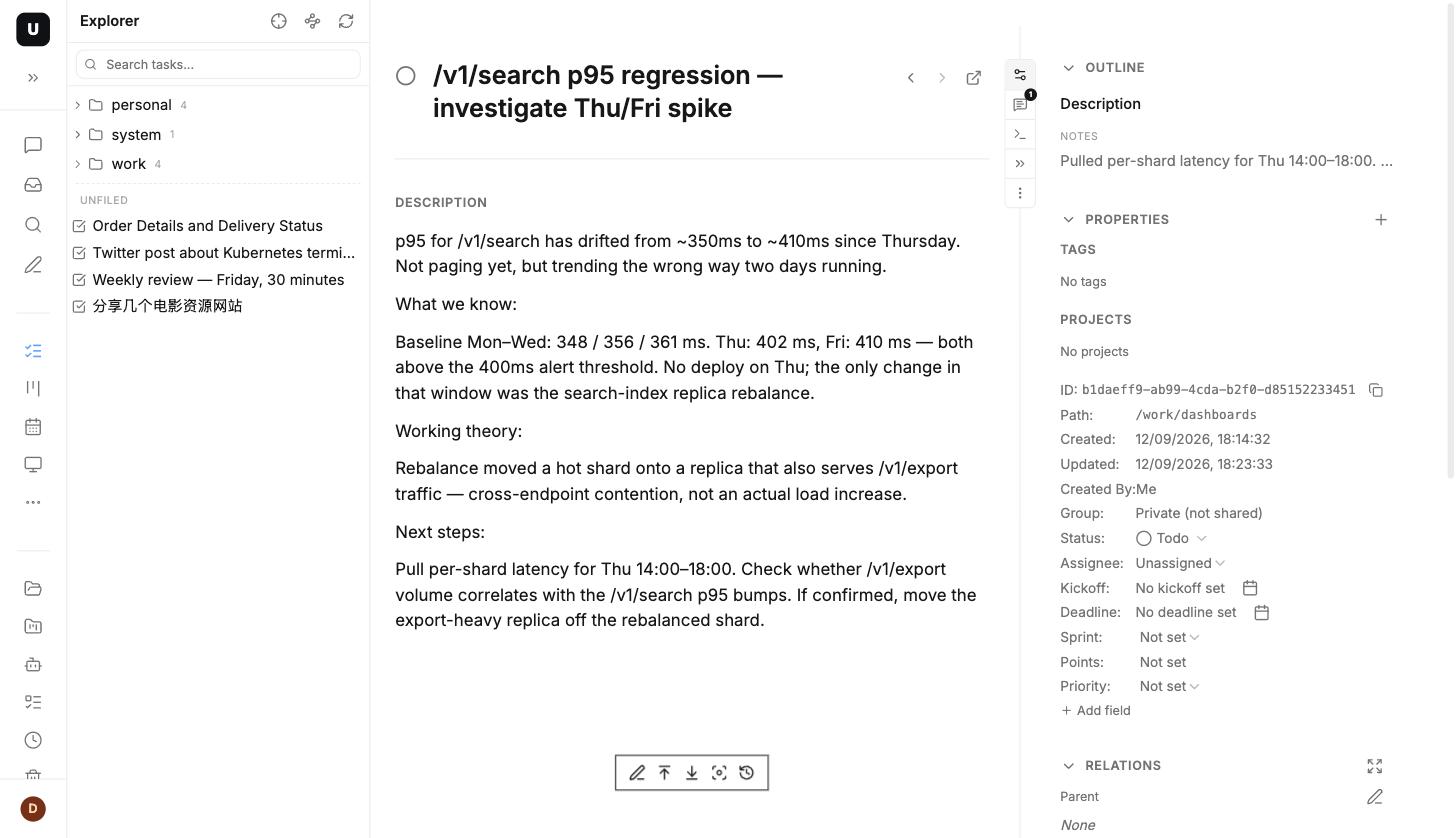
Fig 1 · udctl's Explorer: tasks and files in the same tree.
1. More agents every month, and you're still the only one who remembers
Start with the problem. If you also work through terminal agents, you've probably hit the same few things.
Claude Code, Codex, OpenCode, Gemini CLI, Cline. Terminal agents have been arriving faster than anyone can adapt to them.
The more of them you run, the harder these get to answer:
- That conclusion an agent dug up yesterday, where is it now?
- I wrote the same convention into three agents' directories. Which copy is current?
- What did my agents and I actually finish this month? Is there a list?
- New machine, different agent, and the context starts from zero again. Why?
- I worked this out last week. Why am I working it out again today?
- Whose database is my work sitting in, and if I stop using it one day, can I take all of it out?
The second-to-last one is the expensive one. What repeated work costs you isn't the extra half hour. It's that the second time through, you have no idea you're doing it again.
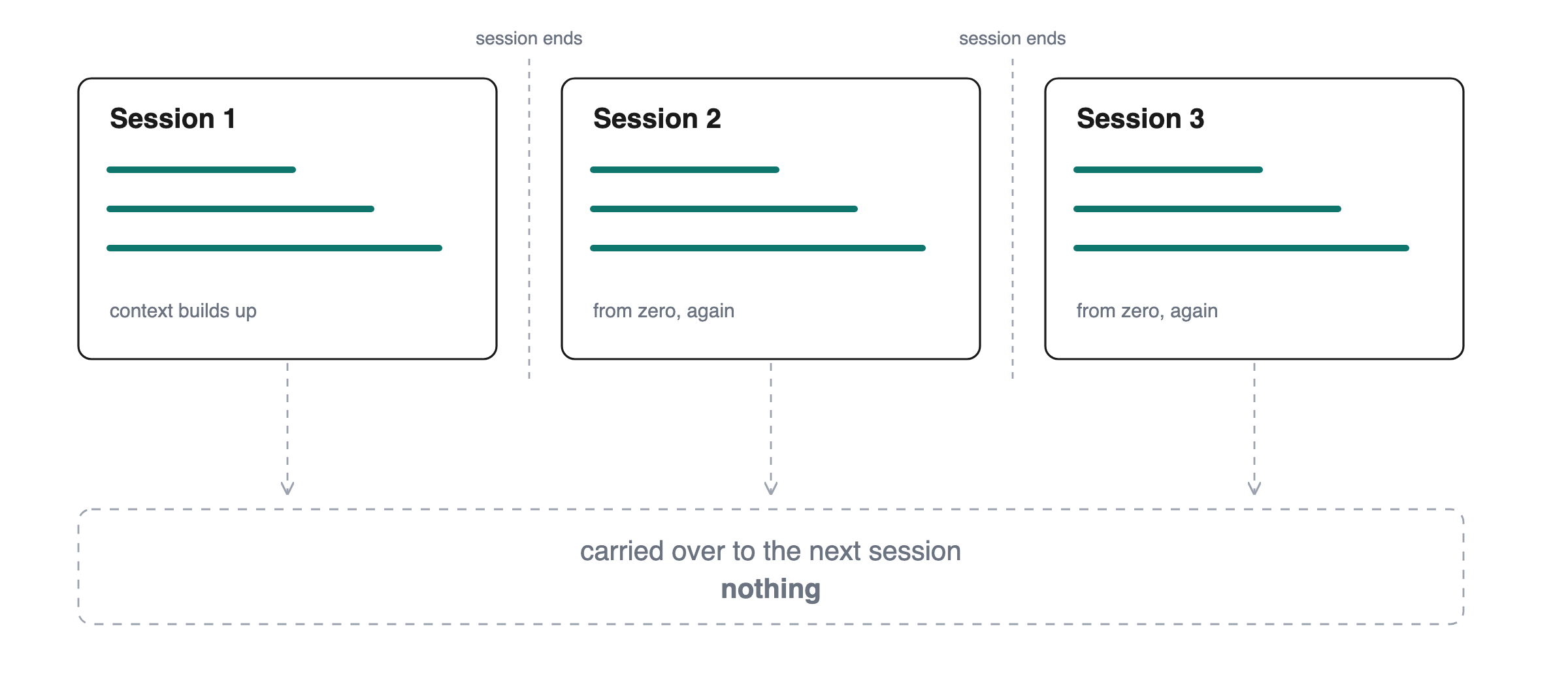
Fig 2 · Before: an agent's memory ended when the session did.
2. The five things this is trying to do
One thing first. There is no shortage of tools that let you write things down: note apps, wikis, a hundred markdown editors.
Most of them stop in the same place. They store it, format it, and put it in front of a human. That's the end of the job.
We care about the other half. Can an agent read that back and write to it directly, with no copy-paste step in the middle?
udctl in one line: a self-hosted workbench that runs on your own machine. People and agents share one copy of the data and read the same bytes.
The chain it's trying to complete has five steps. One container holds it, any agent can read it, it gathers once a day, it settles into long-term memory, and it lands in a directory tree you can open.
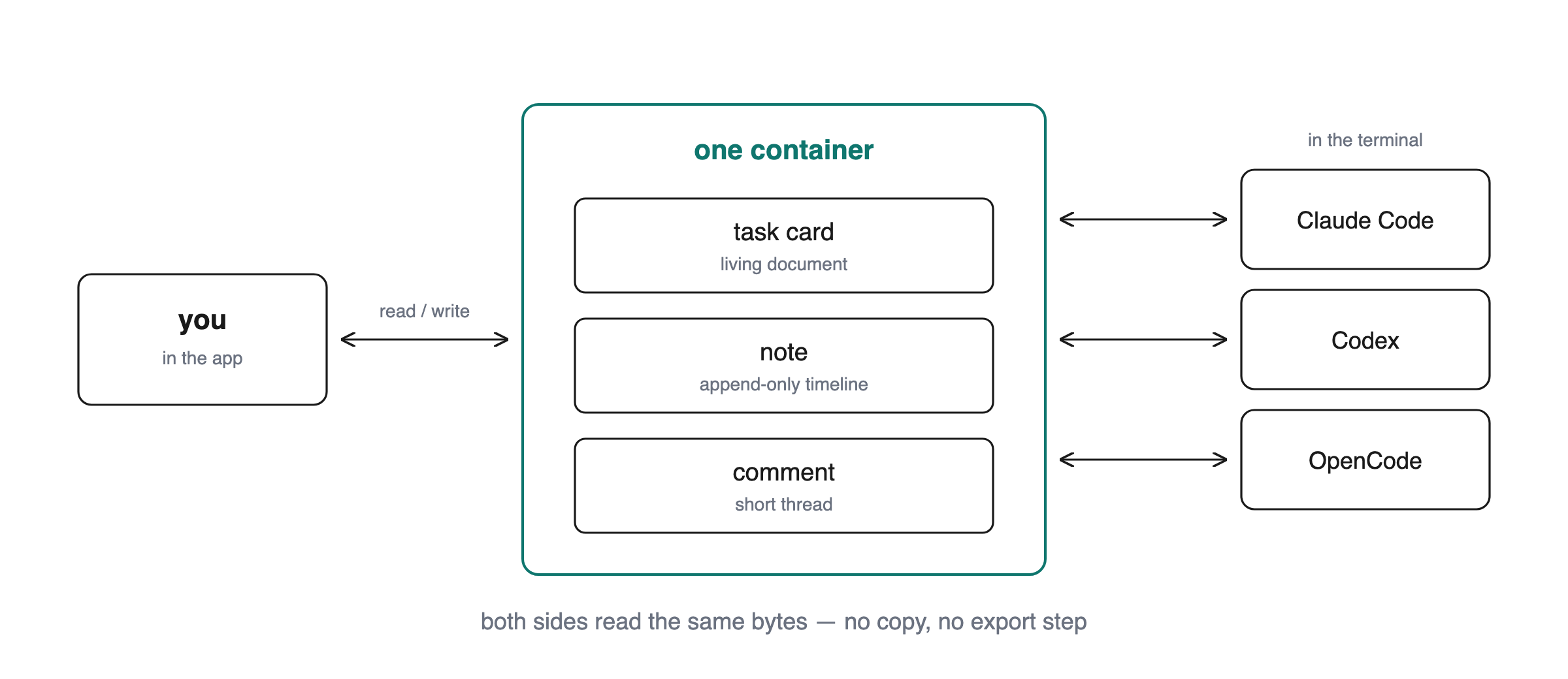
Fig 3 · People and agents share one container: the same card, the same note, the same bytes.
First: see what your agents are doing
udctl manages agents as first-class objects. You can see:
- which sessions are running, and which card each one is attached to
- which agents are registered in the fleet, and what skills each one carries
- whether the last scheduled run succeeded
ud get sessions, ud get agents, ud get scheduled-jobs. Three commands.
It looks at the work surface, not the bill. Usage and cost is a layer we don't do, and don't need to, because agents start from your own login shell, on your own machine, on your own subscription. There's no second billing system, so there's no second set of books to reconcile.
Second: pull scattered conventions into one copy
The hard part isn't managing tools. It's managing the conventions inside them.
One rule can be sitting in three agents' directories at once. A skill you spent an afternoon tuning has to be rewritten when you switch tools. udctl puts them in one library instead. Write your review conventions into a skill of your own called code-reviewer, and ud describe skill code-reviewer hands the same bytes to Claude Code, to Codex and to OpenCode. All three are reading the one copy on your server.
Change it once, and every agent picks it up on its next run.
What that builds is a shared context layer above the individual agents. Write it in one place, and it applies everywhere.
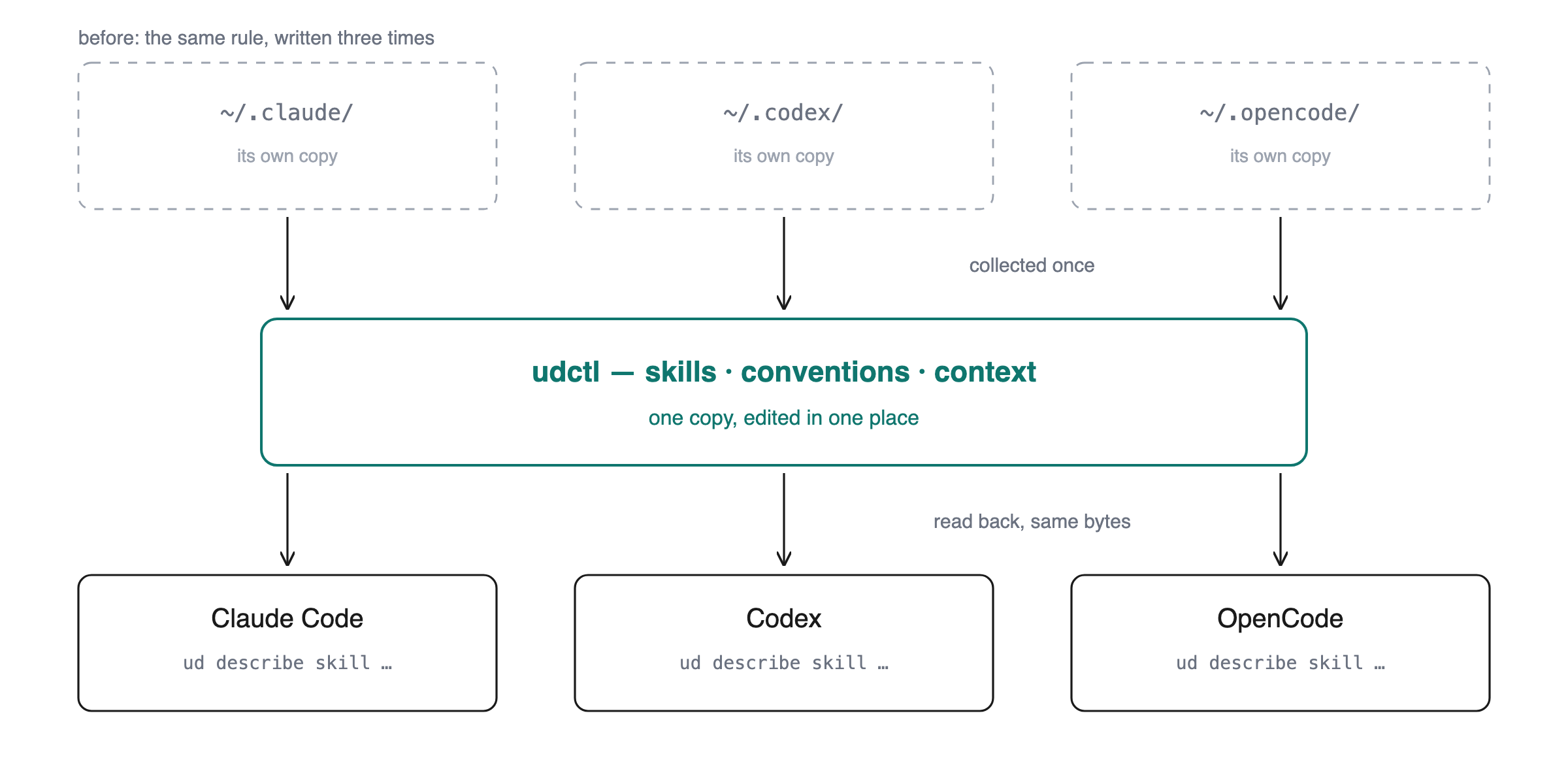
Fig 4 · Reuse across agents: skills, conventions and context go into udctl, then flow back out to each agent.
Third: a card is more than a to-do
In udctl a task is a general-purpose container. It can be a to-do. It can also be a document, a decision record, meeting notes, or a draft you haven't finished.
Under that it splits into three layers. The card body is a living document you edit whenever. Notes are an append-only timeline of how it became what it is today. Comments are short conversation, with people and agents both talking in them.
There's one editor. Tasks, notes, expenses, accounts: everywhere you can type, it's the same Markdown editor.
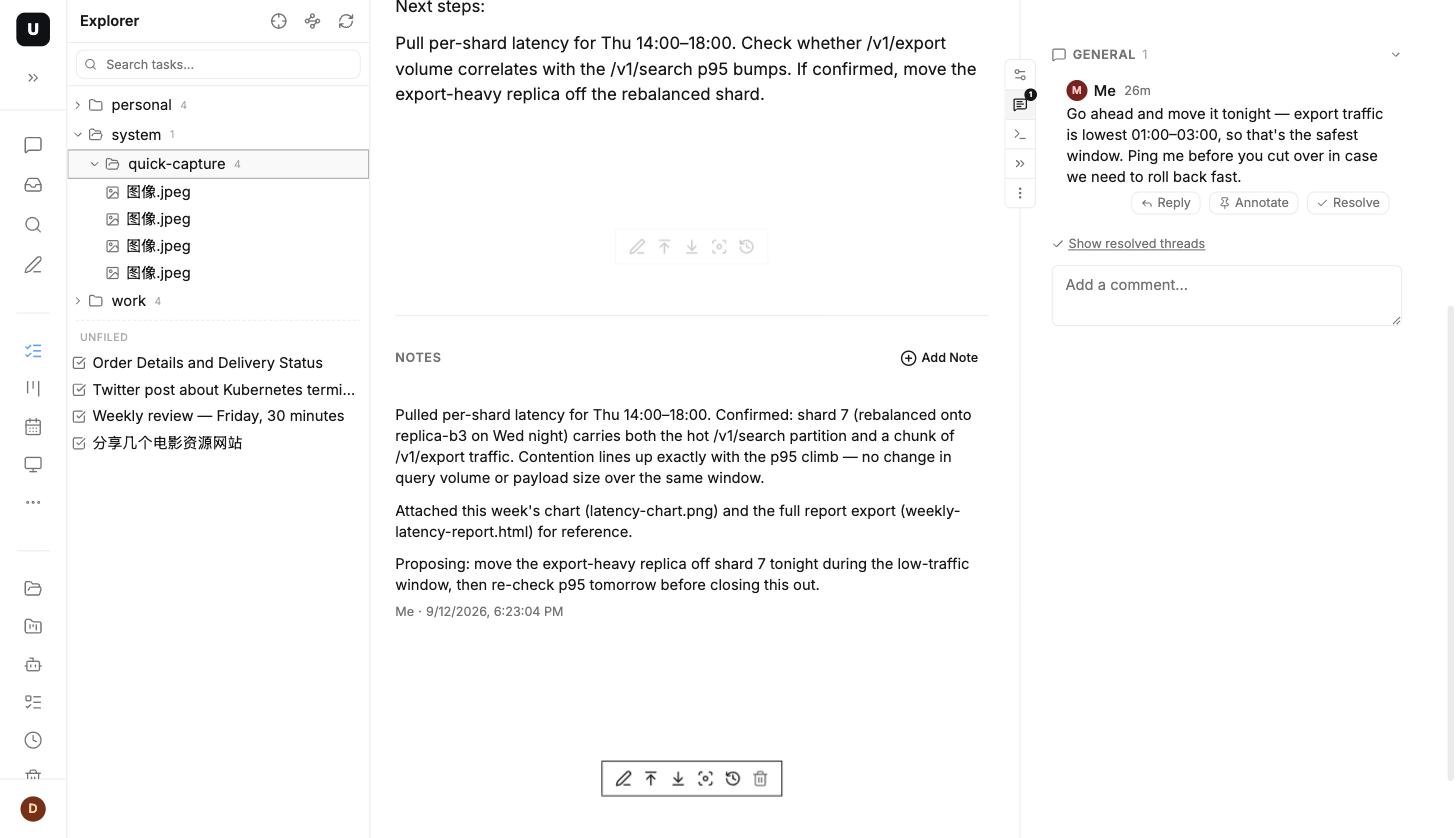
Fig 5 · Card body / notes / comments, three layers, with one editor everywhere you can type.
Fourth: a daily gather, and a pipeline that throws things out
This one needs stating precisely. The setup below is one we built ourselves, not something udctl ships with. The product gives you the container and the scheduled jobs. The arrangement is ours.
On our ledger card, one entry lands per day. On the fourth day the oldest entry moves out of the near pile and is archived into that month's card, and its key points are squeezed into a single monthly compaction.
The moving out is the part that does the work. Without it, "accumulating" is a pile that grows until nobody reads it, which is not far from keeping nothing at all.
Here are the numbers from my own ledger. For the full 31 days of August 2026, the raw daily entries came to 919,538 characters. The monthly compaction that stays in the near pile and gets re-read every day is 13,506 characters. Not a word of the original is gone. It's in the month card, and I can go read it when I need to.
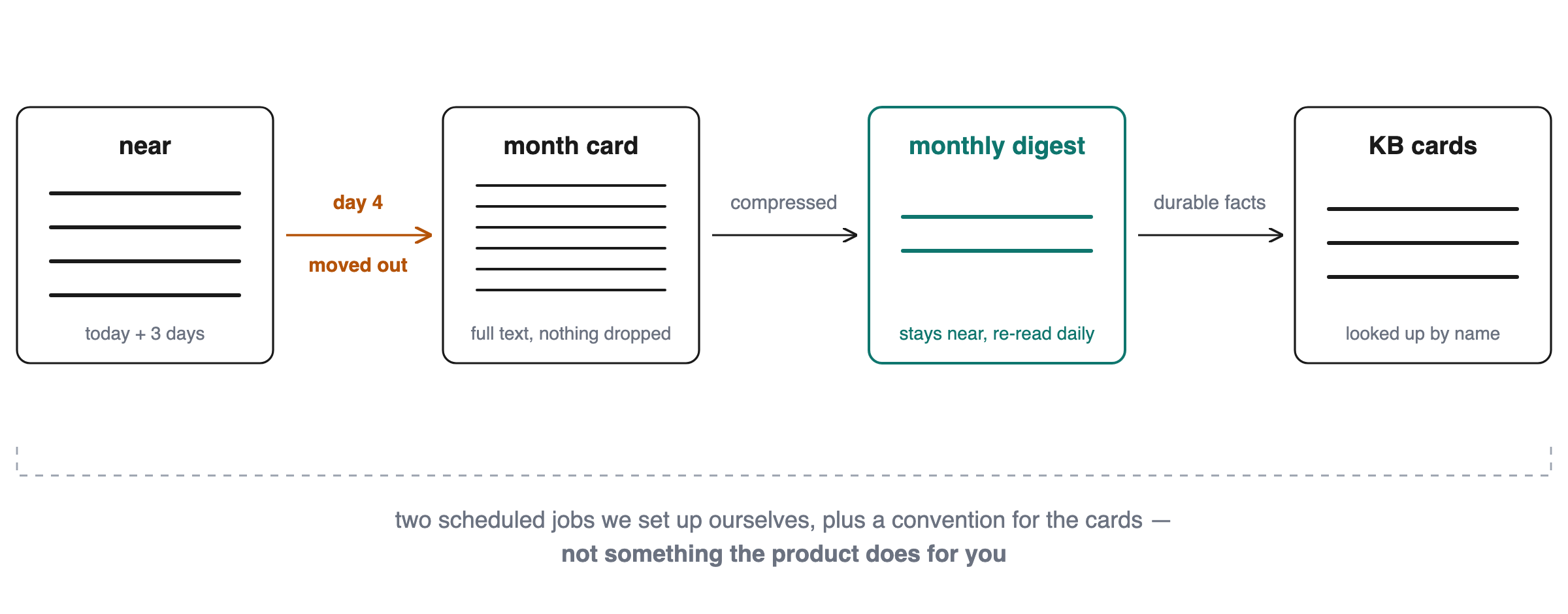
Fig 6 · Daily entry → archived into the month card on day four → squeezed into a monthly compaction → durable facts into the knowledge-base card.
Fifth: what settles has to land somewhere you can open
All of it needs a place to live. In udctl every card and every file hangs on a virtual path: /content/blog, /ud/docs/architecture/, /agents/claude-cert-tutor/lessons/D1/. Together they make a directory tree. Even the built-in skills are on that tree, at /system/skills/ud-cli/.
The tree holds more than cards. Images, PDFs, docx, spreadsheets, CSVs, code, drawio diagrams and HTML all go under the same path, lying next to the cards.
HTML is worth its own line. Upload a .html and opening it in the app gives you the rendered page, not a screen of source. Styles apply, scripts run, and download and full-screen sit right beside it. Our own architecture doc about virtual paths is a .html that has been sitting under /ud/docs/architecture/ all along, and we open it when we need it.
The whole tree can also come down to disk. ud init /Notes/ binds a local folder to a virtual path, and ud pull pulls the cards and files under that path down together, subfolder for subfolder. Cards land as .md, with the filename as the title and a single ud-id line of frontmatter. Files land as themselves. Your editor, your grep and your git all work on them directly.
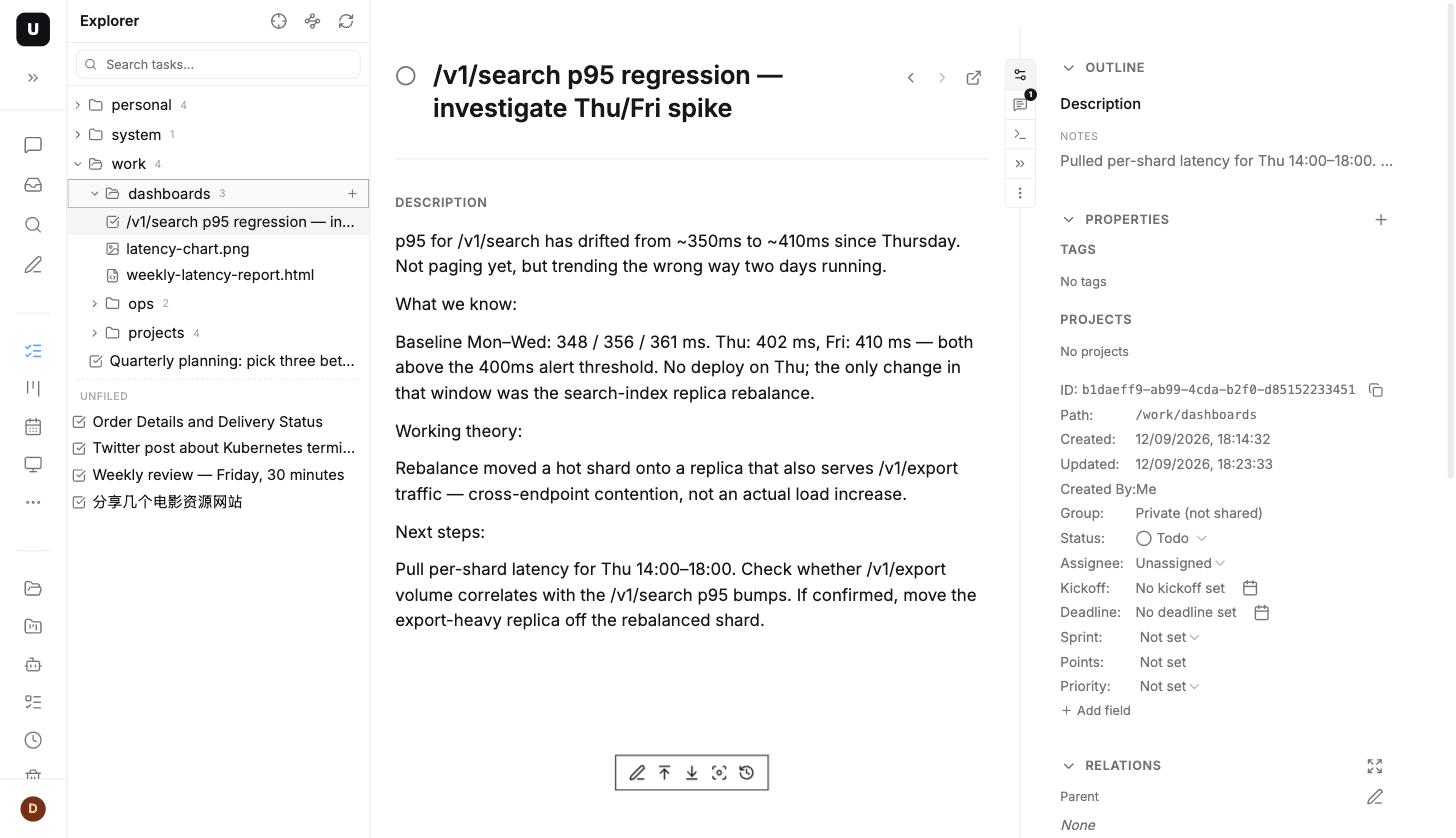
Fig 7 · Cards, images and .html side by side on one tree; opening the .html gives you the rendered page.
3. Whose disk these bytes sit on
There's one line we decided not to cross while building this. Your working record shouldn't have to live with us.
Your record of working with agents holds a lot: what you're building, where you're stuck, who the client is, how the money moves, the approach you used to get around something. That information is valuable to you, and it's valuable to other people too.
So udctl is self-hosted. After you install it, your cards, notes, daily entries and books land in a SQLite file under ~/.ud-server/data on your own machine.
On first launch it doesn't even ask for a password. You open it, and you're in your workbench.
One thing to be straight about: every model call still sends that call's context to the model vendor, and nobody can skip that step. But the copy that stays behind, the cards, the notes, the daily entries, is in that file on your machine.
Your record is yours. That's the whole of what "self-hosted" means here.
4. Who this is for
If any of these describes you, it may be worth a look:
- you work through terminal agents every day, and more than one of them
- you wrote your conventions into a skill and ended up with a copy in three tools' directories
- you have a pile of "I'm fairly sure I solved this before" problems and can't get back to the record
- you'd rather not put your working record, your clients' names and your books in a third party's database
- you want the agent that starts tomorrow to already know where today got to
5. Getting started: three ways to install
There isn't much to pick up. Take whichever one suits you.
Option one: a single command
npm i -g @oatnil/ud-server && ud-server
Six seconds to install, one to start. Open a browser and it's there, with the database created for you.
Option two: Docker. Frontend and backend in one image, one command:
docker run -d -p 3000:8080 \
  -e HOST_DOMAIN=http://localhost:3000 \
  -e JWT_SECRET=change-me-to-a-random-string \
  -e ADMIN_EMAIL=admin@example.com \
  -e ADMIN_PASSWORD=changeme \
  -v undercontrol-data:/app/data \
  lintao0o0/undercontrol:latest
Open http://localhost:3000 and sign in with the email and password you set above. Data goes to SQLite by default. This is the one to leave running on a small machine at home.
Option three: the CLI on its own. npm i -g @oatnil/ud gives you both ud and udctl. This is what the agents use in the terminal.
Where to start
The ledger pipeline above is ours, and you'd probably build a different one. If you don't know where to begin, the smallest version is this: before you stop for the day, have your agent write what it did into a note on one card.
Do that for a week. When the card gets too long to read, go think about archiving and compaction.
Project: https://udctl.com