Is There a Kanban Board for Claude Code Sessions?
Yes, several. claude-code-kanban, Kanban Code and Vibe Kanban all put Claude Code on a board, and all three can start work from it. If you want the board on your own server, with requirements written on the card, a session started by an @mention in a comment, the result back in the card's thread, and the option to move to Codex or OpenCode without changing boards, that is how udctl (UnDercontrol) works. It is self-hosted and free for individuals and teams of up to 3.
See which session is doing what
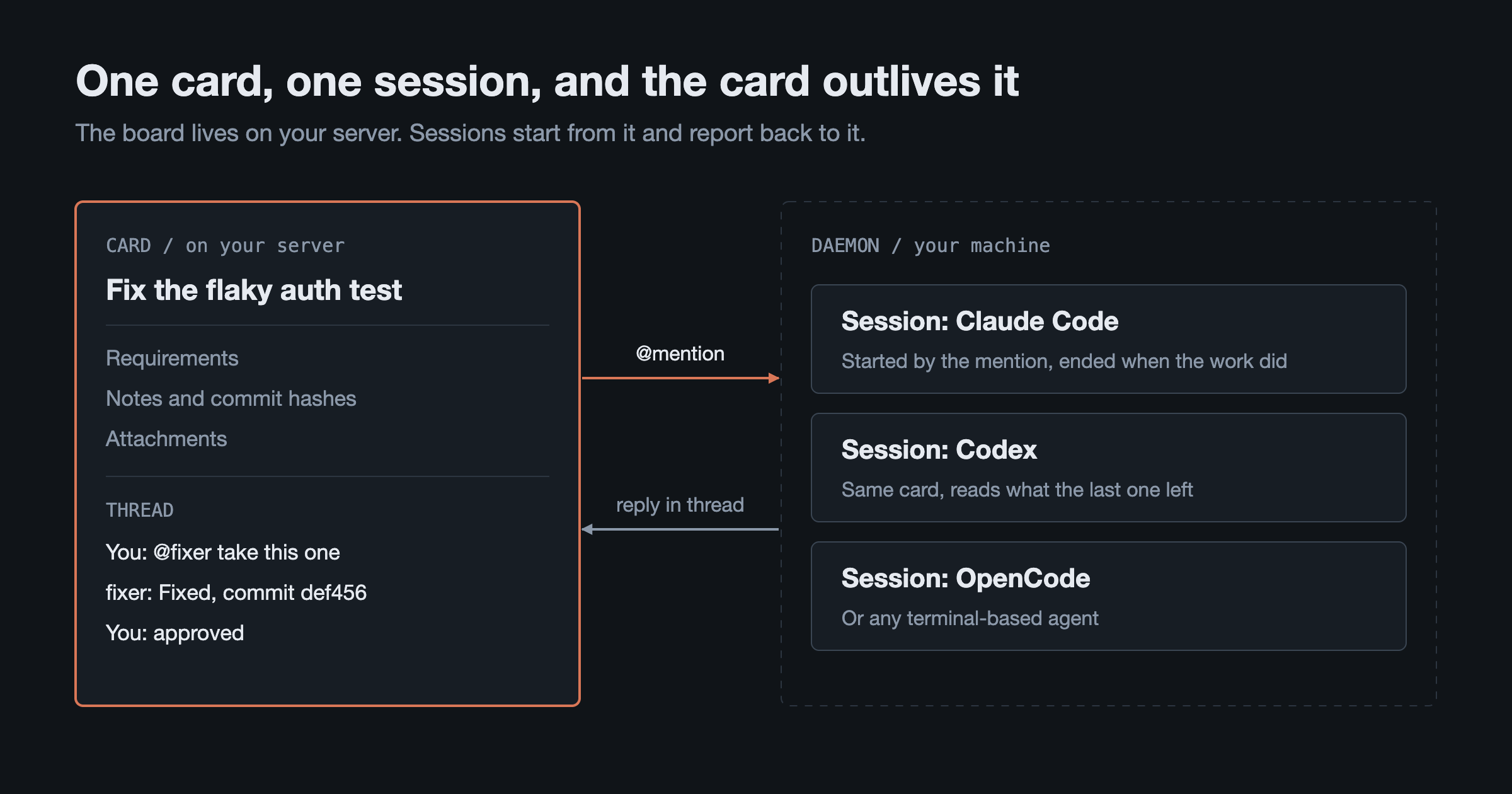
By the fourth Claude Code terminal, you are switching between windows to remember what each one is working on. Write each job as a card and the board keeps track for you. An agent has one session per card, and mentioning the same agent again sends the message into that session. The column a card sits in tells you how far the work has gone.
You can check from the terminal too. This is real ud output for the session running on this post's own card:
$ ud get sessions --task 533f3c5b --status running
ID        TASK      AGENT     DAEMON    STATUS      LAST-SEEN  AGE     CLI
9abbf748  533f3c5b  e77a3904  6f2ad927  running     just now   2m      claude
Start work without opening a terminal
Starting a job takes three steps:
- Write the card. Create it in the web or desktop app, or have an agent create it with
ud. Requirements go in the card body; logs and screenshots go on as attachments. - @mention an agent in a comment. For example,
@fixer please fix this flaky test. The agent has to exist first: give it a name, a prompt and a CLI.ud cook agent create-agentprints the full template. - Wait for the reply. udctl opens a terminal on a machine registered as a daemon and starts the agent there. That machine can be a running desktop app or any machine where you ran
ud daemon start. The agent starts with the card's requirements, notes and links, andudusage is already in its system prompt, so you have no prompt file to maintain.
A typical case: it is Friday afternoon and three small bugs have piled up. Write three cards, mention the agent on each, and the three sessions work separately while you carry on with your own code.
Get interrupted only when a decision is yours
The agent writes progress to the card's notes, commit hashes included, and puts its conclusion in the comment thread. When it considers the work finished, it moves the card to pending for your review instead of closing it. That makes the pending column your review queue, and you can leave the other columns alone.
If the work needs another pass, reply in the same thread and the message goes to the live session there. Agents can @mention each other too, so a lead can hand a subtask to another agent, and nobody on that delegation chain gets more access than you have.
A typical case: the agent has finished the implementation and is stuck between two options. It asks in the thread, you read the question in the iOS app and reply, and it carries on.
Keep the context when the session ends
When a Claude Code session closes, the discussion stays in that session's history. Boards like claude-code-kanban read the task files and transcripts Claude Code writes on your machine, so the board state follows those files.
udctl keeps the card on your server, independent of any one session. The next session runs ud describe task <id> and reads the notes the last one left, including why an approach was rejected three weeks ago. The FAQ has the short version.
This goes beyond tasks. Notes, expenses and accounts use the same Markdown editor as tasks, live in the same store, and are reachable with the same CLI. If the context for a job is half a spec and half a receipt, the agent is one ud command away from both.
Move to Codex without changing boards
Each agent is bound to a CLI launch command: Claude Code, Codex, OpenCode, or any terminal-based agent. The board, cards and threads stay as they are. The desktop app detects CLIs by binary name, including claude, codex, opencode, aider, gemini, copilot and qwen. ud is a plain command-line tool with no plugin, so any agent that can run a shell can use it. The AI agent CLI page has the details.
A typical case: Claude breaks down the requirements, Codex writes the code, and each subscription does its own part. Claude plans, Codex executes walks through the setup.
Pick the board that fits how you work
This table comes from each project's README as of 4 November 2026:
| claude-code-kanban | Kanban Code | Vibe Kanban | udctl | |
|---|---|---|---|---|
| Form | Local web dashboard | Native macOS and Windows app | Local backend plus web UI | Self-hosted server, with web, desktop and iOS clients and a CLI |
| Start work from the board | Yes | Yes | Yes | Yes, by @mentioning an agent in a comment |
| Data source or location | Watches the task files and transcripts Claude Code writes | ~/.kanban-code plus local Claude sessions | Your machine | The server you deploy |
| Agents | Built around Claude Code | README names only Claude Code | Ten, including Claude Code, Codex and OpenCode | Claude Code, Codex, OpenCode and others |
| Several people | Listens on 127.0.0.1 by default, no authentication | Not covered in the README | README does not describe accounts or permissions | Groups with admin and member roles |
| License | MIT | Apache 2.0 | Apache-2.0 | Proprietary, free for individuals and teams of up to 3 |
Choose by how you work:
- One person, one machine, Claude Code only, and you want a live dashboard: pick claude-code-kanban. It runs on localhost and needs no server.
- You want a native desktop app: pick Kanban Code.
- You run several agents in parallel on your own machine and want each workspace to have its own branch, terminal and dev server: pick Vibe Kanban. The company behind it announced its shutdown and the project continues under community maintenance; udctl vs Vibe Kanban has the details.
- You want an always-on server shared by a few people, boards and threads you can read on a phone, and notes and expenses next to your tasks: pick udctl.
Run it on your own machine
The fastest route is the desktop app. The backend is built in, so it works as soon as you open it, and registering the device as a daemon on the Workspaces page lets it take work. To run on a server instead, use the one Docker image:
docker run -d --name undercontrol \
  -p 3000:8080 \
  -e HOST_DOMAIN=http://localhost:3000 \
  -e JWT_SECRET=<generate with: openssl rand -base64 48> \
  -v undercontrol-data:/app/data \
  lintao0o0/undercontrol:latest
Then install the CLI and start a daemon on the machine that will run your agents:
npm install -g @oatnil/ud
ud login
ud daemon start
The full steps are in Getting Started and Self-Hosting. If agent CLIs are new to you, start with how to use an AI agent from the command line.
FAQ
Do I need Claude Code Max?
No. udctl starts the claude command already installed on the machine, with the login it already has, so usage counts against your own account. The same goes for Codex and other agents.
Can two people share the board?
Yes. One person needs no license. A team of up to 3 can request one free license, and larger teams pay by team size. Cards are shared through groups, which have admin and member roles.
Where do the logs live?
The agent's conclusion is in the thread and its progress is in the notes. The full terminal output is streamed by the daemon to the server, and you can still read it after the session ends:
ud describe session <session-id> --tail 40
What permissions does the agent run with?
By default it runs unattended. The built-in launch command for Claude Code is claude --dangerously-skip-permissions and for Codex it is codex --yolo, so a session does not stop to confirm each command, and it has the permissions of the system account running the daemon. You can change the launch command; ud cook agent-cli update-agent-cli shows how. The working directory is set in the board settings and falls back to a dedicated directory, ~/.undercontrol/workspace.
Once it is installed, take one small job you would have opened a terminal for today, write it as a card, and @mention your agent in a comment.